How do I clean the filters in my dishwasher?
 Please Note: The information on this page is for Australian products only. Models, sequences, error codes or settings will vary depending on location and/or where the product had been purchased. To be redirected to your local support page please click here.
To keep the pump area clear, the filters in your Dishwasher should be cleaned regularly. Samsung dishwashers have been designed to place the drain pump and filtering system within easy reach inside the tub for your convenience.
The drain pump drains the dirty water from the dishwater generated while the dishwater is running. Inside the drain pump, there is a filter assembly for filtering debris and foreign matter. If the filter assembly is clogged with debris or foreign matter, it can cause problems, such as abnormal noise, odours from food waste, etc.
See the video and written guides below for steps on how to clean the dishwasher filters.
For a general guide on cleaning and maintaining your Samsung dishwasher, please click here.
Note: The actual design of the filter may differ from the model that you have. To check the design specific to your dishwasher, please refer to your user manual.
Types of Filters
|
Filter |
Description |
|---|---|
|
Main Filter |
|
|
Coarse Filter |
|
|
Fine/Micro Filter |
|
Cleaning the Filters
Note:
- You may want to use protective gloves when removing the filters or checking the sump area.
- The entire filter assembly should be cleaned regularly.
- Never run the dishwasher without the filters in place.
- When cleaning the filters, take care to not inadvertently damage them.


Note: Do NOT put the fine/micro filter in upside down.
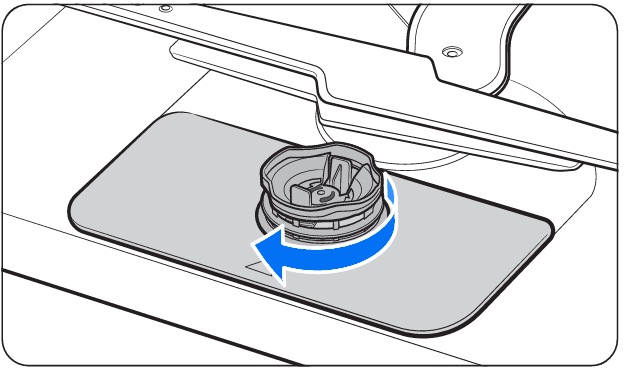
Caution:
- Make sure the Coarse filter is closed properly. A loose cover can reduce the filtering performance.
- When removing the filter, be careful with your hand as it can get caught between the rotor and filter.

For further assistance, please contact our Chat Support. To find your Samsung product's User Manual, head to Manuals & Downloads.

Thank you for your feedback!
Please answer all questions.
Contact Info
Contact us
WhatsApp
![]()
![]()

